DarkHorse IT logo DarkHorse IT
Home KFGO Blog Support About Us Resources Residential Services Business Services

Hidden Malware in Images? What “ClickFix” Means for Your PC and Your Phone
February 26, 2026 · IT Security, Operating System
Hidden Malware in Images? What “ClickFix” Means for Your PC and Your Phone On this week’s Thursday 7:40am KFGO tech segment, we talked about a new threat that sounds almost unbelievable at first. Malware hidden inside image files. The research came from Huntress and highlights a technique being referred to as “ClickFix.” It is a perfect example of how modern cyberattacks are less about breaking software and more about tricking people. Let’s break it down in simple, everyday language. Part 1: Malware Hidden in an Image. What Is Really Happening? Here is the easy explanation. You visit a website. You see what looks like a broken image or CAPTCHA. The site tells you to press certain keys and paste a command to “fix” the issue. When you paste that command into your computer, you unknowingly install malware. The image itself is not magically infecting you. The attacker is hiding malicious code in a way that convinces you to run it yourself. That is the key. You are not hacked by looking at the image. You are tricked into running something you should not. This type of attack primarily targets Windows computers because they allow users to run system commands more freely. What This Looks Like 4 This is classic social engineering. It relies on urgency and confusion. If a website ever tells you to open a system tool and paste code, close the tab immediately. Part 2: What About Phones? iPhone vs Android Security in 2025 After talking about Windows threats like ClickFix, the natural question is: Are phones safer? Let’s compare iPhone and Android side by side. Ecosystem Control iPhone and iOS iPhones are controlled entirely by Apple. Apps come primarily from the App Store Apple reviews apps before approval Security updates are pushed directly to supported devices Apps are heavily sandboxed Many iPhone users swear by this closed ecosystem because it limits risk and reduces complexity. Android Android is developed by Google and used by many manufacturers. Apps come from Google Play and other app stores Users can sideload apps Updates depend on device manufacturers Greater customization and flexibility Android users often love the freedom and flexibility. That flexibility does create a larger attack surface if not managed carefully. Vulnerabilities in 2025 Both platforms have vulnerabilities every year. That is normal for modern operating systems. Android usually reports more total vulnerabilities. That does not automatically mean it is less secure. Android runs on more hardware and allows more flexibility, which increases exposure. iOS typically reports fewer vulnerabilities publicly, but when issues are discovered, they can still be serious. The difference often comes down to ecosystem design and update consistency. Do Phones Need Antivirus? This is one of the most common questions I get. On iPhone Traditional antivirus is not necessary. Why? Apps cannot scan other apps. iOS is tightly sandboxed. Security controls are built into the operating system. Many so called antivirus apps on iOS really provide: Phishing protection Web filtering Data breach alerts VPN services They are security enhancement tools, not traditional antivirus scanners. On Android It depends on how you use your device. If you: Install apps only from Google Play Keep your phone updated Avoid sideloading unknown APK files You likely do not need additional antivirus beyond Google Play Protect. If you: Install apps from unknown sources Disable built in protections Click links from unknown messages Additional security software can add a helpful layer. Five Security Tips for iPhone Users Keep iOS updated at all times Turn on automatic updates Use Face ID or Touch ID with a strong passcode Enable two factor authentication on your Apple ID Review Privacy and Security settings regularly Bonus tip: Use Safety Check in Settings under Privacy and Security to review account and app access. Five Security Tips for Android Users Keep Android and apps updated Leave Google Play Protect enabled Disable Install Unknown Apps Use a strong PIN and biometric lock Enable two factor authentication on your Google account Bonus tip: Review app permissions in the Permissions Manager and remove access that apps do not truly need. How Phones Differ from PCs This is important. On a PC: You can download and run almost anything Malware can deeply integrate into the system Antivirus and endpoint protection are essential On a phone: Apps are sandboxed System level access is restricted The operating system controls app behavior more tightly That is why something like ClickFix is far more dangerous on a Windows PC than on an iPhone. Android sits somewhere in between, depending on user behavior. Quick Takeaways Never paste commands into your device because a website tells you to Phishing is still the number one threat across all platforms Text message scams are increasing rapidly on mobile devices Your email account is often the most valuable target for attackers Updates are one of the most powerful security tools you have Featured Visual 4 Wrap Up The biggest lesson from the Huntress ClickFix research is simple. Modern cyberattacks are not just technical. They are psychological. Your device security depends as much on your decisions as it does on the software. If you keep your devices updated, use strong authentication, and stay skeptical of urgent instructions from websites, you are already ahead of most users. If you want help securing your business computers, employee mobile devices, or your home technology, DarkHorse IT is here to help. Visit us at https://darkhorseit.com Check out the weekly KFGO blog at https://kfgo.darkhorseit.com Watch the show live on Facebook at https://www.facebook.com/darkhorseit We help both business and residential clients with IT Done Right. Image Package for Blog Title: Hidden Malware in Images and Mobile Security in 2025 Alt Text: Illustration comparing iPhone and Android security with shield icons and a warning about malware hidden in images Caption: Modern threats like ClickFix show how social engineering impacts both PCs and mobile devices. Description: A side by side visual comparison of iPhone and Android security concepts with cybersecurity shields and mobile threat indicators, representing the growing importance of user awareness in 2025. Suggested Facebook Snippet This week on our 7:40am KFGO tech segment we talked about malware hidden inside image files and what it means for your PC and your phone. Are iPhones really safer than Android? Do phones need antivirus? What are the top security steps everyone should be taking right now? Read the full breakdown here: https://kfgo.darkhorseit.com Join us live every Thursday at 7:40am on Facebook Live or KFGO radio. DarkHorse IT helps both business and residential clients stay secure in a world of changing cyber threats.

On this week’s Thursday 7:40am KFGO tech segment, we talked about a new threat that sounds almost unbelievable at first. Malware hidden inside image files.

The research came from Huntress and highlights a technique being referred to as “ClickFix.” It is a perfect example of how modern cyberattacks are less about breaking software and more about tricking people.

Let’s break it down in simple, everyday language.


Part 1: Malware Hidden in an Image. What Is Really Happening?

Here is the easy explanation.

You visit a website.
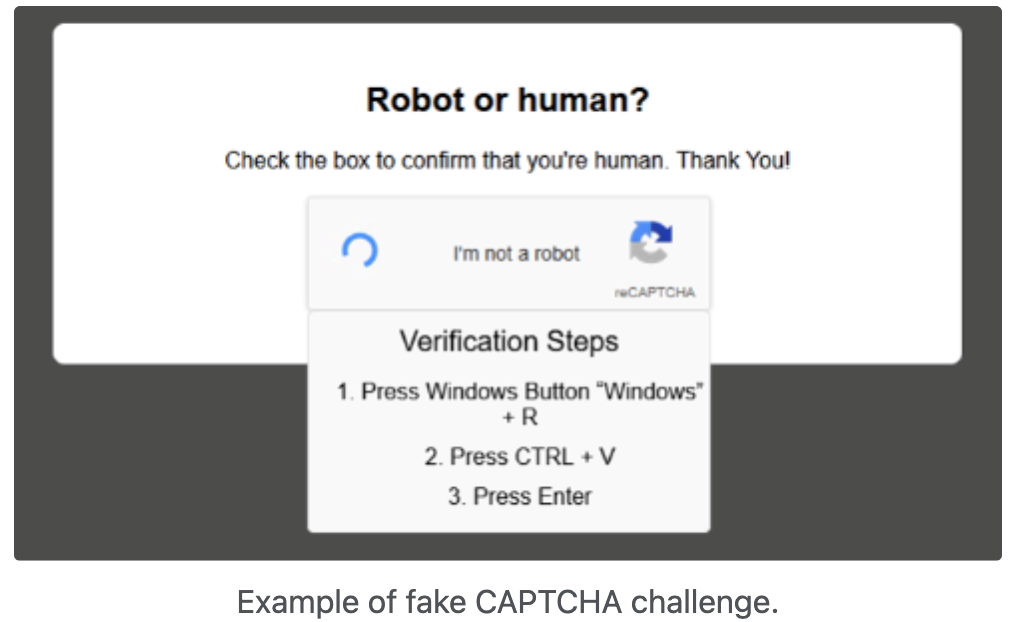
You see what looks like a broken image or CAPTCHA.
The site tells you to press certain keys and paste a command to “fix” the issue.

When you paste that command into your computer, you unknowingly install malware.

The image itself is not magically infecting you. The attacker is hiding malicious code in a way that convinces you to run it yourself.

That is the key.

You are not hacked by looking at the image. You are tricked into running something you should not.

This type of attack primarily targets Windows computers because they allow users to run system commands more freely.

What This Looks Like

https://static.tildacdn.com/tild6538-3239-4337-b435-393935363438/broken-image-example.png
https://nfb.org/sites/nfb.org/files/styles/banner/public/for%20blog_windows%20run.jpg?itok=vcV04Qaf
https://my.crowder.edu/ICS/icsfs/Bad_CAPTCHA.png?target=371cc206-7cf6-418d-a31c-98963ebff439

4

This is classic social engineering. It relies on urgency and confusion.

If a website ever tells you to open a system tool and paste code, close the tab immediately.


Part 2: What About Phones? iPhone vs Android Security in 2025

After talking about Windows threats like ClickFix, the natural question is:

Are phones safer?

Let’s compare iPhone and Android side by side.


Ecosystem Control

iPhone and iOS

iPhones are controlled entirely by Apple.

  • Apps come primarily from the App Store
  • Apple reviews apps before approval
  • Security updates are pushed directly to supported devices
  • Apps are heavily sandboxed

Many iPhone users swear by this closed ecosystem because it limits risk and reduces complexity.


Android

Android is developed by Google and used by many manufacturers.

  • Apps come from Google Play and other app stores
  • Users can sideload apps
  • Updates depend on device manufacturers
  • Greater customization and flexibility

Android users often love the freedom and flexibility. That flexibility does create a larger attack surface if not managed carefully.


Vulnerabilities in 2025

Both platforms have vulnerabilities every year. That is normal for modern operating systems.

Android usually reports more total vulnerabilities. That does not automatically mean it is less secure. Android runs on more hardware and allows more flexibility, which increases exposure.

iOS typically reports fewer vulnerabilities publicly, but when issues are discovered, they can still be serious.

The difference often comes down to ecosystem design and update consistency.


Do Phones Need Antivirus?

This is one of the most common questions I get.

On iPhone

Traditional antivirus is not necessary.

Why?

  • Apps cannot scan other apps.
  • iOS is tightly sandboxed.
  • Security controls are built into the operating system.

Many so called antivirus apps on iOS really provide:

  • Phishing protection
  • Web filtering
  • Data breach alerts
  • VPN services

They are security enhancement tools, not traditional antivirus scanners.


On Android

It depends on how you use your device.

If you:

  • Install apps only from Google Play
  • Keep your phone updated
  • Avoid sideloading unknown APK files

You likely do not need additional antivirus beyond Google Play Protect.

If you:

  • Install apps from unknown sources
  • Disable built in protections
  • Click links from unknown messages

Additional security software can add a helpful layer.


Five Security Tips for iPhone Users

  1. Keep iOS updated at all times
  2. Turn on automatic updates
  3. Use Face ID or Touch ID with a strong passcode
  4. Enable two factor authentication on your Apple ID
  5. Review Privacy and Security settings regularly

Bonus tip: Use Safety Check in Settings under Privacy and Security to review account and app access.


Five Security Tips for Android Users

  1. Keep Android and apps updated
  2. Leave Google Play Protect enabled
  3. Disable Install Unknown Apps
  4. Use a strong PIN and biometric lock
  5. Enable two factor authentication on your Google account

Bonus tip: Review app permissions in the Permissions Manager and remove access that apps do not truly need.


How Phones Differ from PCs

This is important.

On a PC:

  • You can download and run almost anything
  • Malware can deeply integrate into the system
  • Antivirus and endpoint protection are essential

On a phone:

  • Apps are sandboxed
  • System level access is restricted
  • The operating system controls app behavior more tightly

That is why something like ClickFix is far more dangerous on a Windows PC than on an iPhone. Android sits somewhere in between, depending on user behavior.


Quick Takeaways

  • Never paste commands into your device because a website tells you to
  • Phishing is still the number one threat across all platforms
  • Text message scams are increasing rapidly on mobile devices
  • Your email account is often the most valuable target for attackers
  • Updates are one of the most powerful security tools you have

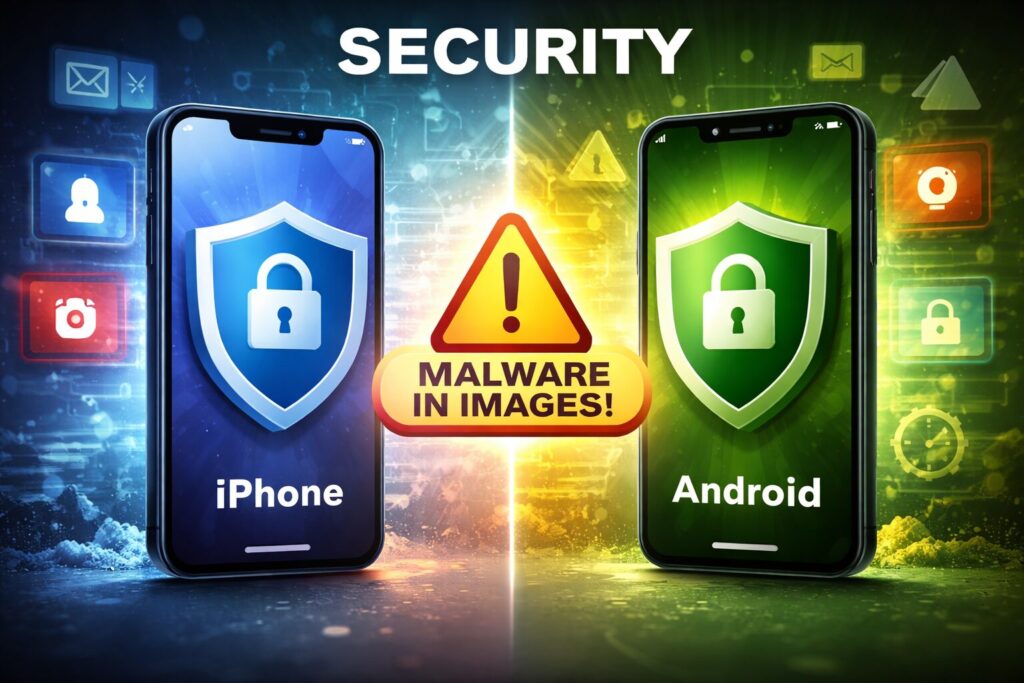
Featured Visual

https://www.aldomedia.com/blog/images/iphone-security-vs-android.png

4


Wrap Up

The biggest lesson from the Huntress ClickFix research is simple.

Modern cyberattacks are not just technical. They are psychological.

Your device security depends as much on your decisions as it does on the software.

If you keep your devices updated, use strong authentication, and stay skeptical of urgent instructions from websites, you are already ahead of most users.

If you want help securing your business computers, employee mobile devices, or your home technology, DarkHorse IT is here to help.

Visit us at https://darkhorseit.com
Check out the weekly KFGO blog at https://kfgo.darkhorseit.com
Watch the show live on Facebook at https://www.facebook.com/darkhorseit

We help both business and residential clients with IT Done Right.

Liked this post? Follow this blog to get more. 


Comments are closed.