 DarkHorse IT
Passwords, Passkeys, and the New Way We Log In
How Signing Into Websites Has Changed
Introduction
During this week’s KFGO tech segment, we talked about something most of us deal with every day but rarely think about.
Logging into websites.
For years we have used passwords, then we added two-factor authentication, and now many websites are starting to support something newer called passkeys.
The goal of all of these is the same:
To make sure you are really you when you try to log in.
But the way they work has changed a lot over time.
Let’s break it down in simple terms.
How Passwords Work (The Old Way)
Think of a password like a secret handshake.
You create a secret and give it to a website when you create your account.
Later, when you come back, the website asks:
“Tell me the secret.”
If the secret matches, they say:
“Okay, come on in.”
That worked fine for many years, but it has some big problems.
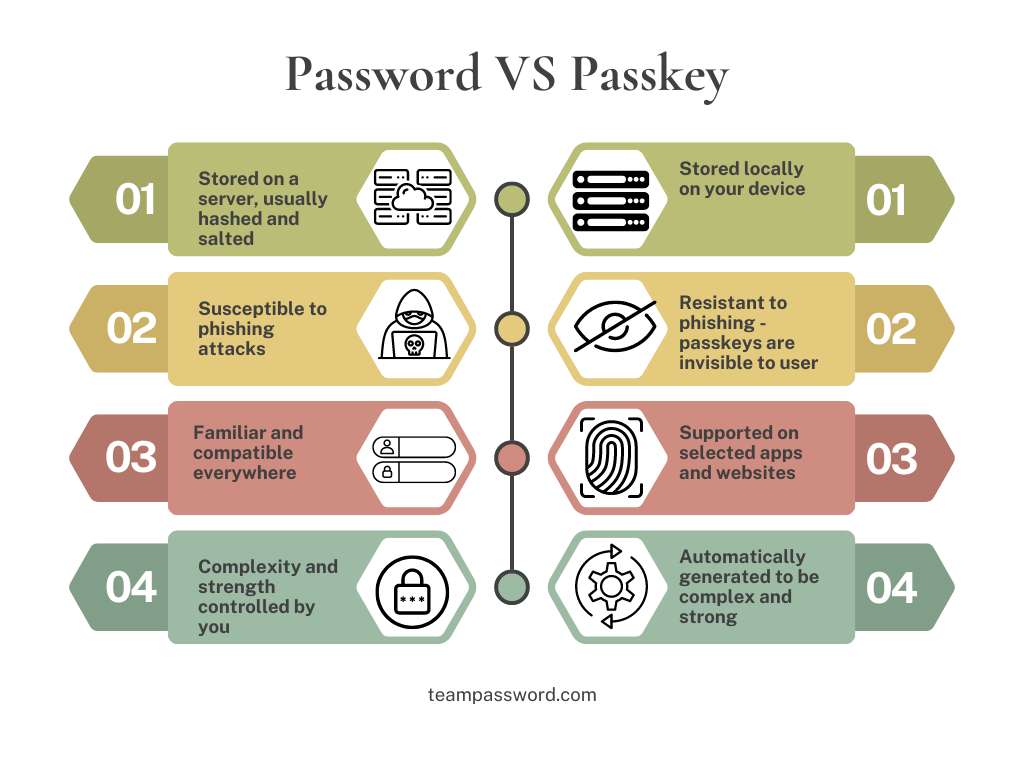
If a hacker breaks into that website and steals the stored passwords, they now have your secret.
Even worse, many people reuse the same password on multiple websites.
So if one site gets hacked, criminals may try that same password on:
- your email
- your bank
- your social media
- your shopping accounts
This is how many accounts get taken over.
Two-Factor Authentication (Adding a Second Lock)
To help solve this problem, websites introduced two-factor authentication, often called 2FA.
This simply means you need two proofs of identity instead of one.
Usually that looks like this:
- Something you know
(your password) - Something you have
(your phone or authentication app)
Examples include:
- A text message code
- A code from Google Authenticator or Microsoft Authenticator
- An email verification code
Even if someone steals your password, they still cannot log in without that second step.
This made accounts much safer.
But there is now an even better option.
What Is a Passkey?
A passkey replaces passwords completely.
Instead of sharing a secret with a website, you use a system based on cryptographic keys.
That sounds complicated, but the idea is actually simple.
Let’s use an analogy.
The Lock and Key Example
Imagine you install a special lock on your door.
You give the website the lock, but you keep the key.
The lock by itself cannot open anything.
Only your key can open it.
When you try to log in, the website sends a challenge to your device.
Your device uses your private key to unlock it and prove that you are the owner.
The important part is this:
Your private key never leaves your device.
So even if the website gets hacked, criminals cannot steal your passkey.
There is nothing useful stored on the server.
Why Passkeys Are Safer
Passkeys solve several problems at once.
They cannot be guessed.
They cannot be reused on multiple sites.
They cannot be stolen from a hacked website.
They also protect against phishing, because your passkey only works with the real website.
Most passkeys are also tied to your device and unlocked using something you already use:
- Face ID
- Fingerprint
- your phone unlock code
So logging in becomes both simpler and safer.
Passwordless Logins
Some companies are also experimenting with passwordless login.
For example:
Microsoft accounts (Outlook.com and Live.com) can send a login approval to your phone.
Other websites may send:
- a one-time login link
- a QR code to scan
- a push notification to approve
This removes passwords completely.
Where Passkeys Are Stored
Passkeys are often tied to the ecosystem you use.
For example:
Apple devices store passkeys in iCloud Keychain.
Android devices store them in Google Password Manager.
Windows can store them using Windows Hello.
These systems work very well if you stay inside one ecosystem.
But if you use a mix of devices, things can get tricky.
For example:
- iPhone
- Windows computer
- Android tablet
Your passkeys may not sync between those systems.
Why I Recommend a Password Manager
This is where tools like Bitwarden come in.
Bitwarden is a password manager that can store:
- passwords
- two-factor codes
- passkeys
Because Bitwarden works across many platforms, you can use the same passkeys on:
- Windows
- Mac
- iPhone
- Android
- Linux
This makes it much easier to manage everything securely.
Your Security Is Only as Strong as Your Weakest Link
There is an old saying:
A chain is only as strong as its weakest link.
The same is true in cybersecurity.
You could have:
- great antivirus software
- strong firewalls
- advanced monitoring tools
But if your passwords are weak or reused, attackers can simply log in.
That is why password security is the first step in cybersecurity.
Quick Security Tips
Here are a few simple habits that make a huge difference.
Use a password manager.
Turn on two-factor authentication whenever possible.
Use passkeys on sites that support them.
Never reuse the same password across websites.
Remove old passwords if you switch to passkeys.
The Future of Logging In
The internet has come a long way.
In the early days, many services did not even require passwords.
Now we have:
- passwords
- two-factor authentication
- passkeys
- passwordless logins
The good news is that security is getting both stronger and easier to use.
And if you see a website offering passkeys, it is usually a good idea to enable them.
Wrap Up
If managing passwords, passkeys, and security settings feels confusing, you are not alone.
That is exactly the kind of thing we help people with every day.
DarkHorse IT helps both business and residential clients stay secure and make technology easier to manage.
Visit us anytime at:
You can also catch the weekly KFGO tech segment and blog here:
And if you want to watch the show live each week, follow us on Facebook:
https://www.facebook.com/darkhorseit
Password VS Passkey
Liked this post? Follow this blog to get more.