
Here is something I have come to accept after more than thirty years in IT. We are all trained to do what the computer tells us to do.
A box pops up, it gives us a step, and we follow it. That is not carelessness. We have spent decades being taught that the instructions on the screen are there to help us. Click here to update. Click here to continue. Check this box to prove you are human.
Attackers figured that out. The newest wave of attacks does not bother trying to break into your computer at all. It just gives you instructions and waits for you to do the work.
The newest trick is called ClickFix
The security industry is calling this one ClickFix, and it is spreading fast.
It usually shows up as one of two things:
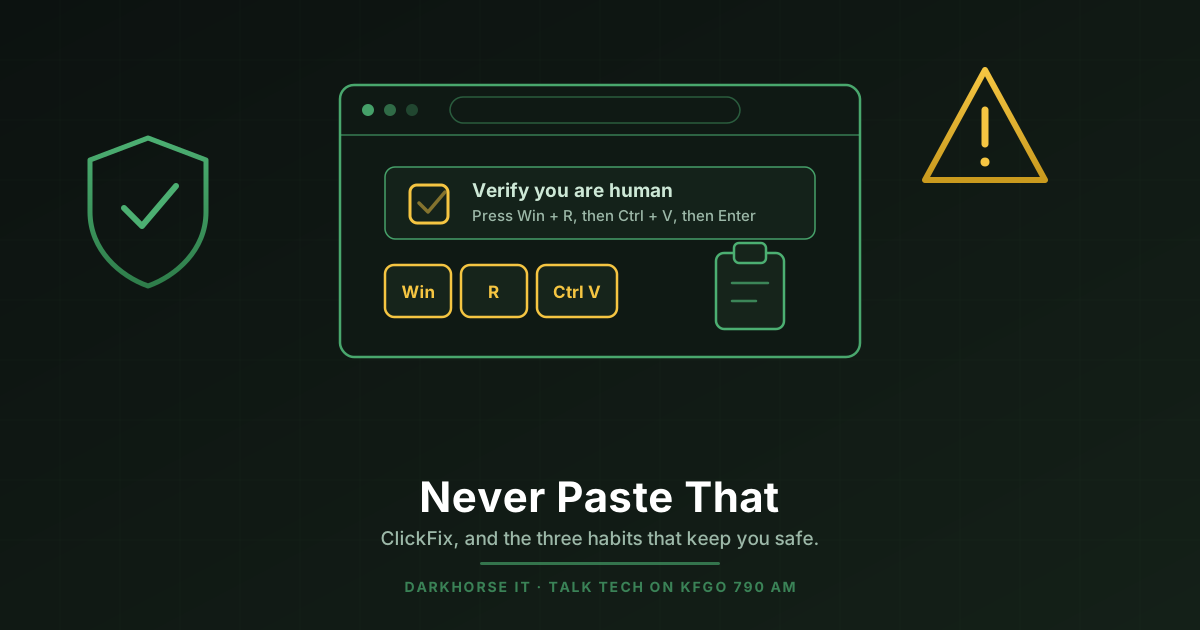
- A fake CAPTCHA, the “verify you are human” box you have clicked a thousand times
- A fake error message, a page or a popup telling you something is broken and here is how to fix it
Either way the instructions have the same shape. It tells you to copy something, paste it somewhere on your computer, and press Enter. Sometimes it walks you through it with numbered steps and little keyboard icons. Sometimes it even copies the text to your clipboard for you, so the only thing left for you to do is paste it.
That paste is the attack. What you are pasting is a command, and when you press Enter your computer runs it. It runs as you, with your permissions, from inside your own session.
There is no exploit involved. No vulnerability, no security hole, nothing to patch. You typed it in yourself, so most security tools have very little to object to. That is exactly why it works so well.
It is worth saying plainly why this one took off. It feels routine. Verifying that you are human is the most boring thing on the internet, and nobody has their guard up during a CAPTCHA. That is the whole point.
The rule that covers every version of it
You do not need to memorize what a malicious command looks like. You do not need to know the difference between a terminal window and a Run box. You only need one rule.
No legitimate website, CAPTCHA, or piece of software will ever ask you to copy something and paste it into your computer.
Not to prove you are human. Not to fix an error. Not to finish an update. Not to verify your browser. Never.
Real CAPTCHAs ask you to click a checkbox or pick out a few pictures. That is the whole list. The moment a verification step involves your keyboard, a copy, a paste, or pressing keys together, you are not being verified. You are being recruited.
Close the tab. Do not finish the steps. If you are worried that the site was something you actually needed, go back to it by typing the address in yourself.
And if you have already done it, if you pasted something and the machine feels off, or even if it feels perfectly normal, get it looked at. That one is genuinely urgent, because these attacks usually finish by stealing saved passwords and login sessions. Do not wait to see what happens.
The three habits that keep you out of trouble
Spotting one scam is useful. But you cannot spot every one of them, and you should not have to. What actually protects you is a setup where getting fooled once does not cost you everything.
Three habits do most of that work.
Habit one: fix your login posture
This is the foundation, and it has two parts.
Long passwords. Not clever ones, long ones. Eighteen characters or more. Length beats complexity every single time. A short password full of symbols and number substitutions is weaker than four random words strung together, and it is far more annoying to live with.
Two factor authentication on everything that offers it. This is the part I will not soften. Nearly every account that matters offers it today: your email, your bank, your Microsoft or Google account, your payroll system, your social media. If you have not turned it on, that is no longer an optional upgrade. It is the difference between a stolen password being an inconvenience and a stolen password being a very bad month. Without it, a leaked password is a login. With it, a leaked password is usually just a leaked password.
And when a service offers passkeys, take them. A passkey replaces the password entirely with a key stored on your device and unlocked by your face, your fingerprint, or your PIN. There is no password to steal, phish, or reuse, which means most of the attacks in this article simply do not apply. Passkey support is showing up in more places every month.
Habit two: use a real password manager
You cannot follow the first habit without this one. Nobody invents and remembers dozens of unique eighteen character passwords on their own. That is not a discipline problem, it is a math problem.
A password manager solves it. It generates the long passwords, remembers them, and fills them in for you, all inside an encrypted vault that only your master password opens.
To be clear about the alternatives:
- A document or a spreadsheet full of passwords is the worst option. It is plain text sitting on a machine, readable by anything running as you.
- Your browser’s built in password saver is better than nothing, but it is a convenience feature, not a security product. It is also one of the first places password stealing malware goes looking.
- A dedicated password manager is the actual answer.
Which one? Honestly, most of them are good, and any password manager beats no password manager. I have exactly one recommendation and one caution.
My recommendation is Bitwarden. It is free for personal use, open source, works on every device and browser, and has a solid track record. If you want to get set up today, we wrote a complete step by step walkthrough: How to Set Up Bitwarden.
My caution is LastPass. They suffered a serious breach in which encrypted customer vault data was stolen, and I have not recommended them since. There are plenty of good options that do not carry that history.
If you want the longer version of why this single habit matters more than almost anything else you could do, I wrote about it here: The One Password Habit That Would Have Stopped Most of the Breaches I Have Seen.
Habit three: verify everything, especially incoming phone calls
This is the habit people resist most, because it feels rude. Do it anyway.
The number on your caller ID is not evidence. There is no way to know whether the number showing up is actually the number calling you. Making an incoming call display your bank’s real main line is trivial, and it costs the caller essentially nothing.
So here is the procedure. It works for a bank, the IRS, Microsoft, your utility company, a vendor, or a relative in trouble:
- Hang up. You do not owe a caller your continued attention. Do not argue, and do not verify anything to them.
- Look up the real number yourself, from a different source. The back of your card, a statement, your own saved contacts, or the company’s website that you typed in yourself. Not a number the caller gave you, and not a number from the email that prompted the call.
- Call that number back.
Here is why this works so well. Faking an incoming call is easy. Intercepting or rerouting a call that you place to a number you looked up independently is a completely different level of difficulty, hard enough that it essentially does not happen to regular people. When you hang up and dial out, you take away the one thing the attacker controlled.
Any legitimate caller will be completely fine with this. If someone pressures you to stay on the line, that pressure is the tell.
The real lesson is a shift in mindset
I do not think the answer to any of this is more fear. Fear makes people freeze or unplug, and neither one helps.
The answer is accepting that the ground is moving under all of us. AI has made this kind of attack cheaper, faster, and far more convincing. The scam call does not have broken grammar and a bad accent anymore. The phishing email does not have obvious typos. The voice on the phone can sound like someone you know. We covered how to handle that in How to Spot a Scam in the Age of AI, and the same AI acceleration is why the window to patch a known flaw collapsed from two years to same day.
IT security has become one of the fastest changing fields there is, right alongside software development, and it is not a niche concern for technical people anymore. It reaches everybody with a phone and a bank account.
The shift is this. Stop asking whether something looks legitimate, and start asking whether you have verified it through a channel the sender does not control.
That second question survives every new trick, including the ones nobody has invented yet.
The short version
- Nothing legitimate ever asks you to copy and paste something into your computer. Close the tab.
- Long passwords plus two factor authentication everywhere, and passkeys wherever they are offered.
- A real password manager. Bitwarden if you want a recommendation.
- Hang up, look the number up yourself, and call back.
None of that costs money. Most of it is one afternoon of setup that then protects you for years.
If you would rather not sort through it alone, or you want it done properly across a whole household or a business, that is exactly the kind of thing we do. Reach out to DarkHorse IT any time.
We talk through this kind of thing every week. Join us Thursdays at 7:40 AM on KFGO 790 AM.